Introduction
When crisis strikes at an event – whether a sudden lightning storm, a fast-moving fire, or a security threat – how you communicate can literally save lives. In 2026, event organizers have more tools than ever to instantly alert and guide crowds. From SMS blast systems that reach every phone in seconds to push notifications via event apps, and from PA system overrides to flashing digital signage and even wearable alerts, technology can keep attendees safe and calm when every second counts. The key is using these tools in a coordinated, strategic way. Veteran event technologists stress that emergency mass notification is not just about tech – it’s about having a well-tested plan, clear messaging, and a unified “one voice” approach so attendees get timely, trusted instructions and know exactly what to do.
This comprehensive 2026 guide explores the technology and strategies behind effective emergency communications at events of all sizes. You’ll learn how to deploy instant text alerts, trigger push messages in your mobile app, override AV systems to broadcast urgent announcements, flash evacuation directions on jumbotrons, and even leverage wearables for discreet alerts. Importantly, we cover practical steps to implement and test an emergency communication plan – from pre-writing alert scripts and integrating systems, to running drills and training staff on festival evacuation procedures. Real-world case studies illustrate what works (like a festival app that helped evacuate tens of thousands ahead of a storm) and what happens when communication fails (lessons from events where confusion led to chaos). By the end of this guide, you’ll have an actionable playbook to ensure that if the worst happens, you have the tools and plan to keep attendees informed, calm, and out of harm’s way.
(Note: All guidance here is rooted in decades of on-site experience and industry best practices. Be sure to adapt to your event’s specific needs and follow local regulations and safety protocols.)
Why Fast Mass Communication Matters
When Every Second Counts in a Crisis
In an emergency, speed is everything. Whether it’s an approaching tornado or an active security threat, the first few moments are critical for preventing injuries and saving lives. Attendees might only have minutes – or seconds – to seek shelter or move to safe areas. Fast mass notification tech allows organizers to instantly reach tens of thousands of people with lifesaving instructions. For example, when a major outdoor festival detected lightning nearby, organizers sent a push alert and PA announcement within seconds, giving the crowd a head start to seek shelter using smart wayfinding solutions. By acting early, they avoided disaster and everyone was safe. In contrast, delays or confusion in communication can be catastrophic. The 2021 Astroworld tragedy illustrated how communication breakdowns worsen emergencies – overloaded radios and lack of unified messaging contributed to chaos and delayed critical medical response. The lesson is clear: the faster and clearer you can communicate, the better the outcome. Every tool that shaves seconds off the alert timeline – whether a preset text blast or an automated screen message – can make a life-saving difference.
Go Cashless With RFID Technology
Enable contactless payments, faster entry, and real-time spending analytics with RFID wristbands and NFC-enabled ticketing for your events.
Preventing Panic and Crowd Surges
Effective emergency communication isn’t just about speed; it’s also about calming nerves and guiding orderly behavior. In a crisis, crowds left in the dark tend to panic or make poor decisions. Rumors fly, fear spikes, and dangerous crowd surges or stampedes can occur if people aren’t sure what’s happening or where to go. A well-crafted, authoritative message can prevent panic by providing clear, specific instructions and reassurance, similar to festival communications that cut through the noise. For example, at Germany’s Rock am Ring festival, organizers swiftly told 90,000 attendees to “leave the site in a calm and controlled manner” after a security threat forced an evacuation. Because the message was prompt and clear (delivered in multiple languages over PA and screens), the huge crowd exited peacefully without chaos. On the other hand, lack of communication has led to deadly crowd surges in the past. Concert safety experts emphasize that crowd management technology and communication go hand-in-hand – timely alerts, visible exit guidance, and staff instructions all work together to prevent the kind of confusion that triggers crushing incidents, a lesson highlighted in analyses of mega-event critical communications. Attendees will follow directions if you give them, so it’s crucial to be that guiding voice. When people hear a confident announcement or see an official alert, they’re more likely to stay calm and move in an orderly fashion instead of pushing or stampeding, especially when supported by well-planned evacuation procedures. In short, fast mass notifications keep a scary situation from spiraling into something much worse by removing the information vacuum that feeds panic.
Attendee Expectations and Duty of Care in 2026
Modern event-goers live in a world of instant information – they expect that if something’s wrong, “someone will notify us immediately on our phones or onsite”. By 2026, major festivals, stadiums, and even conferences have accustomed audiences to seeing alerts on event apps, receiving SMS updates, or hearing emergency PA announcements when needed. Failing to communicate in a crisis isn’t just a safety risk, it’s a breach of attendees’ trust and your duty of care. Regulators and insurance providers also increasingly look for evidence of a solid emergency communication plan in event safety protocols. In many regions, safety permits require having public address systems and text alert capabilities for crowd warnings. Data shows that attendees feel significantly safer at events where they know emergency plans are in place and visible, often facilitated by festival panic button apps. Conversely, events that have fumbled communications – such as the infamous Fyre Festival, where organizers went silent as conditions deteriorated – face enormous backlash and reputational damage, underscoring the importance of keeping attendees informed via SMS. Experienced promoters know that robust emergency comms aren’t optional; they’re a core part of audience safety and event reputation. Delivering timely, transparent information during a crisis not only protects people in the moment, it also shows afterward that you did everything possible to manage the situation responsibly. In fact, communicating well under pressure can enhance your credibility – attendees and authorities will remember that your team kept everyone informed and safe. From a business perspective, it’s a no-brainer: taking emergency communication seriously is part of being a professional, trusted event organizer in 2026.
Ready to Sell Tickets?
Create professional event pages with built-in payment processing, marketing tools, and real-time analytics.
SMS Blast Systems: Reaching Everyone’s Phone
The Power of SMS Alerts in Emergencies
SMS text messaging remains one of the fastest, most reliable ways to reach a mass audience in an emergency. Texts don’t require a smartphone or any app – every attendee with a mobile phone (smart or not) can get an SMS, making it the ultimate wide-net channel. Crucially, SMS alerts have incredibly high open rates and immediacy. Studies show about 98% of text messages are eventually read, and a large portion within mere minutes of receipt, according to mass text messaging statistics. Think about it: when your phone buzzes with a text, you nearly always look. That makes SMS blasts ideal for urgent alerts like “Seek shelter now” or “Avoid X area”. During a crisis, text messages cut through the noise – people might miss a social media post or an email, but a text ding gets attention. For example, at one 85,000-person festival, organizers used an SMS emergency alert system to notify attendees of a lightning hold: “6:45 PM: Lightning in area – all stages on hold. Please move to the nearest shelter. Next update by 7:00 PM.” Attendees’ phones lit up simultaneously with the message, reaching even those chasing kids or not looking at the stage screens, effectively keeping guardians informed without apps. In surveys after the event, many parents said the text was how they realized to seek cover. This illustrates SMS’s strength: it actively pushes critical info straight into everyone’s pocket, overriding whatever else they were doing in that moment.
Moreover, SMS can work in low-bandwidth situations – texts are very lightweight data-wise, so even if the event’s Wi-Fi is down or cellular data is overloaded, SMS often still trickles through (though extreme network congestion can delay them, which is why redundancy is key, as we’ll cover). In short, an SMS blast system is a cornerstone of mass notification because it offers unparalleled reach and speed. It’s no wonder that public safety agencies worldwide leverage SMS for emergency alerts (like weather warnings or Amber Alerts). For events, having the capability to shoot out a mass text within seconds of an incident decision (e.g. to evacuate or hold the show) is like having a direct line to your entire audience’s attention.
Best Practices for Effective Text Blasts
While SMS alerts are powerful, they must be used thoughtfully to be effective in a crisis. Here are key best practices seasoned event communicators follow:
- Collect Opt-In and Maintain Privacy: Don’t wait until an emergency to gather phone numbers. Encourage attendees to opt in to SMS alerts during registration or ticket purchase (e.g. a checkbox for “urgent event updates”). Emphasize that this number will only be used for critical safety notices, not spam. This opt-in not only builds trust, it’s legally important for compliance with anti-spam laws and privacy regulations like GDPR, ensuring you are keeping guardians informed without apps. (Emergency messages may be allowable under “vital interest” exemptions, but it’s still best practice to have consent.) Safely store this data and ensure your SMS system is GDPR-compliant by allowing easy opt-out and protecting personal info. Attendees are more willing to share their number if they know it’s for their safety and handled responsibly – transparency is key.
- Keep Messages Clear and Concise: In a crisis, people don’t have time to read a novel on their phone. Craft emergency texts to be short, specific, and action-oriented. Lead with an alert keyword (e.g. “Weather Alert:” or “Security Notice:”) to grab attention. Then state exactly what to do or not do. For example: “Weather Alert: Severe winds approaching. ALL attendees must calmly move indoors or to vehicles immediately. Follow staff directions. Updates to follow.” Avoid unnecessary info; focus on the action and location if relevant. If space allows (SMS is 160 characters per segment), you can include where to get more info (e.g. “See app for details” or a short URL), but the core instruction must stand alone. Pre-writing these templates for likely scenarios helps immensely – you don’t want to be typing from scratch under duress, so utilize pre-written scripts for crisis messaging.
- Time-Stamp and Update: If the situation is evolving, let people know when they’ll hear more. In the earlier example, note the “Next update by 7:00 PM.” Including a time-stamp or promise of an update is important to manage expectations and prevent rumors. It reassures attendees that you’re monitoring and they should await further instructions (instead of speculating). Always follow through on those updates, even if the update is “still on hold, thank you for patience” – silence creates confusion. Some advanced mass SMS platforms allow a series of pre-scheduled follow-ups or two-way capability (e.g. attendees can reply “HELP” or questions), but for most events, one-way broadcast with periodic updates is sufficient and simpler to manage.
- Test the System Quietly: You don’t want the first ever use of your SMS system to be during a real emergency. Do a dry run before the event – for instance, an internal test SMS to staff phones to ensure blast timing is fast and message format comes through correctly. It’s also wise to test with a small group on-site during setup (e.g. send a non-emergency message like “This is a test of the event alert system, no action needed” to a few staff/volunteers scattered around) to confirm messages deliver quickly on the local cell networks. If you encounter delays or carrier filtering issues during tests, work with your SMS service provider to resolve them. Tip: Have the sending number/code clearly labeled (e.g. the sender name shows as “FestivalAlert” if possible) so it’s recognizable. This way, in a real emergency, people don’t ignore the text thinking it’s spam.
- Integrate Text with Other Channels: SMS is powerful alone, but it’s even better when used in concert with other alert channels. For example, you might send an SMS and trigger a mobile app push and a PA announcement at the same time for maximum coverage, a strategy supported by multi-channel emergency communication plans. Redundancy is critical because not everyone will see every channel – someone in a loud crowd might miss a text vibration but hear the PA, while someone in a restroom might miss the PA but see the text. We’ll discuss multi-channel strategy later, but keep in mind that SMS should be one part of a layered communication approach, not the only tool. Relying on just one method is a common mistake; as one mass notification expert put it, “Using only text is like only pulling the fire alarm – one piece of the plan isn’t enough,” highlighting why text is not reliable as a sole emergency plan. If you trigger them together, they reinforce the urgency and reach more people.
Finally, avoid overusing the SMS system for non-emergencies. Reserve it for true urgent situations so that when a text from you arrives, attendees know it’s serious. If you start texting too many minor schedule updates or promotions, people may start to ignore your messages or opt out – which defeats the purpose. Some events use SMS for important but non-emergency info (like last-minute schedule changes or reminders), but if you do, label those clearly (“FYI” or “Reminder”) so that when an actual emergency alert comes, it stands out with its urgent phrasing. Maintaining that trust – that a text from you means pay attention now – is vital.
Example: SMS in Action (and Inaction)
To appreciate the impact of SMS alerts, consider two real-world scenarios:
- Successful Use – Bonnaroo 2016 (USA): Bonnaroo, a major U.S. music festival (?85,000 attendees), faced a severe lightning storm one evening. Organizers had prepared an opt-in SMS list for attendees who registered their phones. When lightning neared, they blasted out a text to all subscribers instructing fans to evacuate stages and seek shelter in their cars or designated buildings, effectively telling attendees to seek shelter. At the same moment, stage screens displayed the same message and stage MCs announced it. Attendees later reported that the SMS alert was critical – many in distant camping areas or parking lots didn’t hear the PA, but their phones beeped with the warning. The result? Tens of thousands moved to safety well before the storm hit, and no one was hurt. The festival was able to resume after the weather passed. Bonnaroo’s quick multi-channel alerts likely prevented injuries and chaos, and earned praise for keeping everyone in the loop.
- Lessons from Failure – TomorrowWorld 2015 (USA): Contrast that with TomorrowWorld 2015, a festival in Georgia that became infamous for stranding thousands of attendees in a storm. Heavy rain turned parking and shuttle roads to mud on Saturday night, and organizers abruptly halted shuttles and closed exits without a solid communication plan, leading to thousands of stranded fans. There was no mass SMS system in place (only social media posts and an email that many never saw in time). Attendees leaving the festival found themselves lost in the dark, with no transportation and minimal guidance. Many slept in the mud by the roadside as confusion reigned. The organizers eventually canceled the final day for off-site attendees, but by then the damage was done – the lack of an emergency comms system left people feeling abandoned and furious, as reported in coverage of the TomorrowWorld cancellation. TomorrowWorld’s post-mortem made it clear: had they been able to blast texts or coordinated alerts about the transport shutdown and where to go for shelter, much of the chaos could have been avoided. Instead, their failure to communicate turned a weather problem into a full-blown humanitarian fiasco. This starkly illustrates why any large event needs a reliable way to reach attendees en masse during unforeseen disruptions.
Mobile App Push Notifications: Your Pocket PA System
Leveraging Event Apps for Instant Alerts
If your event has a dedicated mobile app or a Progressive Web App, it can double as an emergency broadcast channel through push notifications. Push alerts via an event app are incredibly valuable because they can provide rich, targeted information directly to smartphones, often faster than SMS. With a push notification, you’re not limited to 160 characters – you can include more text, or even images and links (depending on the app) that users can tap for details. Many events in 2026 build an alert feature into their apps for both routine updates and emergencies, utilizing push alerts and crisis messaging. For example, a large music festival’s app might normally send schedule reminders or sponsor messages. That same infrastructure can send a critical alert like “?? Emergency Update: Severe weather approaching – all stages paused. Please head to the nearest shelter now (see map in app). Stay calm and we’ll provide updates shortly.” The app can display this prominently on the lock screen of attendees’ phones, often with a distinctive sound/vibration, mimicking the effect of a text message but with even more contextual info (like maybe a map of shelter locations once they tap it). During the 2022 season, several European festivals successfully used app push alerts to manage weather holds – one festival in Belgium sent multilingual push notifications to 60,000 users warning of an incoming storm and pointing to specific shelter areas, complete with a link to a map in-app. Attendees commented that it was like having a personal guide in their pocket.
Push notifications offer fine-tuned control too. You can send to all users or target sub-groups (for instance, if your app tracks locations or ticket types, you might send a specific alert to just those in one venue area). They also integrate well with other digital systems – for instance, tying into a weather feed so an alert auto-triggers in the app when lightning is detected (something some events do as a fail-safe), often linked to smart wayfinding and digital signage. One of the biggest advantages: if an attendee has your app, they’re likely an engaged fan, so they’ll have their phone on them and are primed to trust notifications from you. In essence, the event app becomes a direct line to your most attentive attendees, functioning like a personal PA system that reaches into their hand.
However, relying on push notifications has one obvious caveat: it only reaches those who have downloaded the app and allowed notifications. At some events, that might be the majority of attendees; at others, it could be a small fraction (especially at public festivals where many skip the app). So, while push alerts are awesome for those who get them, they must be part of a multi-channel mix, not the sole solution. That said, even if, say, 40% of your crowd has the app with notifications on, that’s 40% of people you can instantly ping at zero cost, which is hugely beneficial. Those folks often help spread the word to others around them (“My phone says we have to evacuate to the arena building, did you get that?”). In crowded venues where phone signals might jam, sometimes a push over Wi-Fi (if the event app uses the local network) can also get through when SMS can’t. The bottom line: use your event app’s push capability to its fullest for emergencies – it’s a potent tool to have when seconds count.
Crafting and Timing Push Alerts
Many of the same principles for SMS apply to push notifications, but there are some differences in execution:
- Keep it Short and Front-Loaded: Push notifications typically show a concise preview on screen (maybe 1-2 lines) and then the rest when opened. Lead with the urgent info and instruction right up front. E.g., “?? Lightning storm coming – seek shelter now.” Don’t bury the lede behind a greeting or long explanation. Assume the user might only see the first 8-10 words on their lock screen initially.
- Use Clear Titles (if app supports it): Some apps allow a title or header on the push message. Use that for the alert type if possible (e.g., “Emergency Update” or “Weather Alert”) to grab attention. Visually, the ?? emoji or the word “Alert” at the start can help signal importance (many public alert systems use this convention). But avoid overdoing all-caps or exclamation points – you want urgency without causing more alarm than necessary. Calm authority is the tone.
- Include Next Steps/Details: Unlike SMS, a push can often direct users to more content. Take advantage of that: you might have a page in the app with detailed instructions, a map, or FAQs. For example, the push text says “Bomb threat reported, event paused – follow staff to exits. Tap for details.” and tapping opens a page with info on exit locations or updates from organizers. Make sure any such page is lightweight (simple text/image) because in an emergency, cell data could be slow – you don’t want a heavy page that won’t load. Ideally, build these pages offline-capable in the app (or have maps pre-loaded) so even if connectivity drops, the info comes up.
- Leverage App Features: Maps, Schedules: If your emergency involves directing people to specific places or telling them what’s next, integrate that into the app’s features. For instance, if evacuating to specific shelters, a geolocated map in the app can show “You are here” and highlight nearest exits/shelters, utilizing smart wayfinding technology. Or if a day’s schedule is adjusted (say a delay and restart time), push the alert and also update the schedule in-app with a prominent note like “All performances currently on hold due to weather. Estimated restart at 5:00 PM.” The push gets their attention, and the app provides the depth.
- Repeat Important Pushes if Needed: One push may not be enough, especially if a crisis is ongoing. Don’t be afraid to send follow-up push notifications as the situation evolves (“Update: Storm passing, no injuries reported. Gates will reopen at 4:00 PM – please return slowly.”). Include time stamps or sequence indicators (like “UPDATE 2: …”) so users know it’s the latest message. However, avoid sending too many too fast – each should add new info or confirmation. Two or three well-timed pushes over an hour is fine; 10 in 10 minutes is overload and could cause people to disable notifications.
- Test Push Systems and Load: Like SMS, test your push notification system. One consideration: some event apps rely on internet connectivity, so if your venue’s network is weak, push messages might queue or delay. Test under show conditions if possible (e.g., during a smaller event or when a crowd is present) to see how fast notifications go out. Also test on both iOS and Android devices for any differences. If your app developer or provider offers an “emergency blast” feature, ensure your team knows how to use it quickly (admin interface, etc.). Speed of use is key – navigating through five admin screens to send a push is not ideal in a crisis. Streamline it or prepare a quick-access method.
Many events choose to integrate their push notification system with their overall crisis dashboard. For example, the control room might have a single web console that can send an SMS and an app push and trigger screen messages all at once, a capability found in advanced smart venue systems (this can be achieved with certain mass notification platforms or some custom integration). Even if it’s separate systems, practice how you will hit the “Send Alert” button on all – maybe one person sends the SMS while another triggers the app push, per a pre-assigned protocol, to save precious seconds.
Driving Adoption: Get Attendees to Enable Notifications
Push alerts only work if users have your app and have allowed notifications. One challenge is that some people download the app but opt out of notifications, or never download the app at all. Before an emergency ever happens, encourage attendees to download the app and enable alerts as part of your event onboarding. For instance:
- Send a pre-event email or social post highlighting: “Stay informed & safe: Download our app and allow notifications for any urgent updates during the event.” Sell it as a safety and convenience feature (which it is). Mention that critical alerts like weather or schedule changes will come through the app.
- On site, use signage or screen messages during downtime: “? Download the [EventName] app for real-time updates and emergency alerts.” Perhaps offer a small incentive (e.g., “show you have the app at the info booth for a free water”) to boost uptake – hydrated and informed is a good combo!
- If your app has a registration/login, you can prompt users to opt in to notifications as part of that flow with a clear rationale (“Allow notifications to receive emergency alerts and important schedule changes”). Many will tap “Allow” if they understand it’s for their benefit, not spam.
- Work with your ticketing partner: Some ticketing platforms (like Ticket Fairy’s) integrate with event apps and can seamlessly invite ticket buyers into the app environment. Also, since Ticket Fairy and similar platforms provide full attendee data, you could send a last-minute SMS or email to all ticket holders right before the event specifically urging app download for safety alerts (e.g., “We care about your safety – please install our free event app now so you’ll instantly get any urgent updates or weather alerts during the show.”). This multi-channel promotion of the app can significantly increase adoption rates among the audience most likely to be on site.
Despite best efforts, assume not everyone will have the app. This is why you never rely on push alone. But even partial coverage can be life-saving when combined with other channels. And those who do get the push will often assist those around them. There’s a concept in safety called “force multipliers” – each person who gets the message can multiply its reach by telling others. So every additional attendee you get onto your app alerts is another node of communication in the crowd, helping spread the word.
Public Address Systems & Audio Alerts
Using PA Systems as the Voice of Authority
Onsite Public Address (PA) systems – from stage speaker setups to dedicated emergency sound systems – are the most direct way to literally tell your crowd what to do. Even in the era of smartphones, the PA announcement remains absolutely vital for mass communication, especially to reach large groups simultaneously in a contained area. When done right, a clear announcement booming over the speakers can cut through a roaring crowd and grab everyone’s attention in an instant. It provides a human (or at least human-like) touch that text on a screen can’t fully replicate – tone of voice, urgency, calmness can all be conveyed auditorily. This is why veteran event safety managers always include PA plans in their emergency protocols, often practiced during festival evacuation procedures and drills.
To leverage the PA effectively in a crisis, consider these points:
- Ensure Audibility Everywhere: First, you need to have adequate speaker coverage. Many venues and festival grounds have “dead zones” where normal stage audio doesn’t reach well (behind structures, in restrooms, etc.). It’s important to have supplemental PA speakers or bullhorns for these areas, or staff equipped to relay messages. Some modern venues have zoned PA or even voice evacuation systems that override all zones with a clear announcement in emergencies, a key component of smart venue wayfinding. Test your PA coverage during soundcheck or rehearsals – walk the grounds and listen. If you can’t hear an announcement well in some corner, assume attendees can’t either and address it (add a speaker or plan to send staff there in person if needed).
- One Voice, One Message: Establish a single authoritative voice for emergency announcements. This is critical to avoid confusion and maintain one voice when things get real. Decide in advance who will speak over the PA in various scenarios – it might be the event’s safety officer, the production director, or the stage MC, depending on context. The key is that the message is consistent. You don’t want different stage hosts ad-libbing differently at the same time. Many events adopt a “One Voice Policy,” meaning all emergency instructions come from a single source or are centrally scripted. For example, if multiple stages have separate MCs, instruct them that in an emergency they should all patch in to a common feed or defer to the primary stage’s announcement. At a minimum, give them a script to read verbatim so the wording doesn’t conflict. A unified message carries far more authority – attendees hear all around them the same instruction and know it’s official.
- Train the Announcers: Speaking to a panicked crowd is not easy. Train anyone who might make emergency announcements in the right tone and approach, ensuring they can maintain one voice during emergencies. The voice should be calm, firm, and clear – not frantic. Short, direct sentences work best (“Ladies and gentlemen, may I have your attention. For your safety, we need everyone to move indoors now due to an emergency. Please proceed calmly to the nearest exit and shelter in the building. Staff are there to assist. Remain calm and we will provide updates shortly.”). If using a non-native language for some attendees, avoid local idioms or complex words – keep it universally understandable. It can help to have an MC or speaker with a reassuring style; some events actually bring in public safety officials or hire professional announcers for this role because it’s so crucial. Whoever it is, make sure they’re comfortable on the mic and perhaps run through a couple of emergency scripts during rehearsal so they don’t freeze up. Confidence over the PA is contagious – if the voice sounds in control, the crowd will feel more in control.
- Have Backup Power and Gear: An obvious but often overlooked point – what if the power goes out? Many emergencies (fires, storms) can knock out power exactly when you need to make an announcement. Always have backup power for critical audio systems. This could be UPS battery backups on the mixing console and amplifiers, or a generator ready to kick in. At minimum, keep a megaphone or battery-powered bullhorns as a fallback, as recommended in festival evacuation planning guides. In a pinch, staff or security can use megaphones to walk through areas and shout instructions. It’s not ideal for large crowds, but it’s better than silence. Also consider redundancy: if one stage’s PA fails, can another stage’s system cover, or can you use a vehicle PA (like a police car loudspeaker) to assist? Think through worst-case “audio blackout” scenarios and plan for alternates.
- Use All Audio Channels (Not Just the Main Stage): If you have multiple sound systems (multiple stages, zones, two-way radios with loudspeakers, etc.), utilize them. For instance, you might have a site-wide radio channel that can broadcast a recorded evacuation message through dispersed speakers (some events set up separate emergency PA just for this). Even DJ booth monitors or vendor PA systems can be leveraged if they can patch in – some festivals have an emergency button that feeds a message into all stage audio feeds simultaneously. If tech allows, consider ducking the music and making an announcement in the middle of performances if urgent. Artists should be briefed that if they see a certain signal (like a red light or a stage manager cue), they must pause because an emergency announcement is coming. Many big festivals like Glastonbury or Lollapalooza have had artists stop mid-song to allow an evacuation order to be delivered – and because it was rehearsed and understood beforehand, it happened smoothly, as seen in case studies of weather-tested events.
Coordinating Stage and Venue Announcements
Communication with the crowd via audio can come from different sources: the main stage MC, a disembodied recorded voice, security staff with handheld PA, etc. It’s vital to coordinate these so they don’t conflict or cause confusion. Here’s how experienced teams coordinate audio comms:
- Chain of Command for Stop/Go: Establish who has the authority to cut the music and make an announcement. Usually, this is decided in the emergency action plan – e.g., only the Event Director or Safety Officer can call an evacuation, and they will signal the sound engineer to cut the sound. Make sure every stage’s crew knows the protocol: if they get the order, immediately mute performers and open the emergency mic channel. Time is of the essence; a delayed cut could mean attendees miss half the announcement over the din of music. Many tragedies have been compounded by confusion over who could stop the show (the 2011 Indiana State Fair stage collapse is a notable example where lack of a clear decision led to a delayed evacuation call), emphasizing the need for one voice protocols. Learn from that – decide and drill it in advance.
- Pre-Script Messages for PA: Just like with texts and pushes, have pre-written scripts for PA announcements for your top scenarios, a crucial part of festival evacuation procedures. These should be slightly longer than a text but still concise. They can be tailored to be spoken live or even played as a pre-recorded voice if that’s an option. Some events have a set of prerecorded emergency announcements in multiple languages voiced by a professional – you hit a button and it plays. Live is more flexible, but pre-recordings guarantee clarity under stress. Either way, scripts ensure you don’t forget key info. A basic example: “May I have your attention please. Due to a security incident in the venue, we are pausing the event. Please remain calm and move toward the exits as directed by staff. This is for everyone’s safety. Do not run. Follow the instructions of security personnel and exit in an orderly manner. We will update you when it is safe to return or with further information. Thank you for your cooperation.” This covers the who/what (security incident, pausing), the action (move to exits calmly), the reassurance (for safety, we’ll update), and the tone (firm but polite). Have these scripts refined with input from security and communications experts, and ideally pre-approved by any authorities or stakeholders so you’re not ad-libbing in a panic. Multi-language is a plus if you have large segments of non-English speakers – perhaps repeat the announcement in the top 2-3 languages (which may require translation help in advance; don’t improv that in real-time!), utilizing multilingual crisis messaging scripts.
- Stage MCs vs. Central Announcer: If you have multiple stages, you might either feed one announcement from a central point to all, or have each stage’s MC relay it. Both can work, but central is more uniform. Some events use the main stage MC or a prominent figure as the “voice” across all PAs (patched through). Others give each stage MC the script to read, on cue. The latter can be fine if they all stick to it, but there’s risk one might deviate or the timing staggers. A hybrid approach: main stage makes the announcement first, then each other stage MC immediately echoes it on their mic for reinforcement. This double delivery can actually help – people hear it, then hear it again from the person they’ve been listening to on that stage. The key is consistency of content.
- Volume and Clarity: In an emergency announcement, override volume limiters if possible – it should be loud and clear (but not so distorted that it’s unintelligible). If your crowd has been facing massive concert speakers, their hearing might be dulled; you’ll need a strong volume to get their attention. Some venues automate this – an emergency mode that sets volume to max safe level and bypasses any local volume restrictions (with great power comes responsibility – use only for true emergencies). Also consider any hearing-impaired attendees – do you have a system like an induction loop or captions on screens for announcements? Providing captions on LED walls for announcements is an excellent practice for accessibility and for clarity in noisy environments, as seen in weather-ready festival operations. Many newer digital signage systems can automatically show the text of a PA message in sync (more on that in the next section).
Finally, don’t underestimate the psychological impact of a strong audio message. Hearing a calm voice saying “we have this under control, here’s what to do” can seriously reduce panic. Attendees have often reported that just knowing someone was directing them made them feel safer in scary moments. As an organizer, being that voice of guidance is one of the most important roles you play when things go wrong. So invest in your PA system, prepare your messages, and be ready to use them decisively.
PA & Audio Communication Summary
To summarize the role of audio alerts, here’s a quick reference table:
| Audio Alert Tool | Best Use Case | Advantages | Considerations/Limitations |
|---|---|---|---|
| Main Stage PA System | Venue-wide/addressing entire crowd | Reaches everyone in earshot simultaneously; conveys tone and urgency in voice, supporting one voice protocols. | May not cover remote areas; requires power – ensure backup. Performers must pause to avoid interference. |
| Distributed Speakers | Fill sound gaps (camping areas, halls) | Extends reach of announcements to all zones; can be tied into main feed or used for specific zones. | Needs careful zoning to avoid echo/conflict; test audibility in all areas during evacuation planning. |
| Stage MC Announcements | Reinforcing message at individual stages | Leverages familiar voices artists/audience know; can localize instructions if needed per stage. | Must stick to script for consistency to maintain one voice; may need coordination so all MCs speak in sync. |
| Megaphones/Bullhorns | Backup for power loss or small areas | Portable, battery-powered – good fallback if sound system fails; helpful for staff to direct clusters of people. | Limited range (effective only over tens of meters); not loud enough for huge crowds or noisy situations. |
| Pre-recorded Voice Messages | Automated or multi-language announcements | Guarantees clarity and correct wording under pressure; can play simultaneously in different languages via smart signage systems. | Lacks flexibility (no on-the-fly updates); may sound impersonal if voice is too robotic. |
| Venue Alarm Tones/Sirens | Initial grab of attention (e.g. fire alarm) | Instantly signals that something’s wrong even before details; universally recognized signals (e.g. siren, whoop tone). | Must be paired with voice instructions to avoid confusion; can cause panic if used alone without explanation. |
Key tips: Always ensure one clear voice and message across all audio channels. Have backup methods in case of power or system failure. And integrate audio alerts with your other channels (for example, trigger screens and texts at the same time you make a PA announcement, so multiple senses are engaged). By treating the PA system as a coordinated part of your mass notification toolkit, you ensure no one misses the memo when every second counts.
Digital Signage & Visual Alerts
Turning Screens into Emergency Billboards
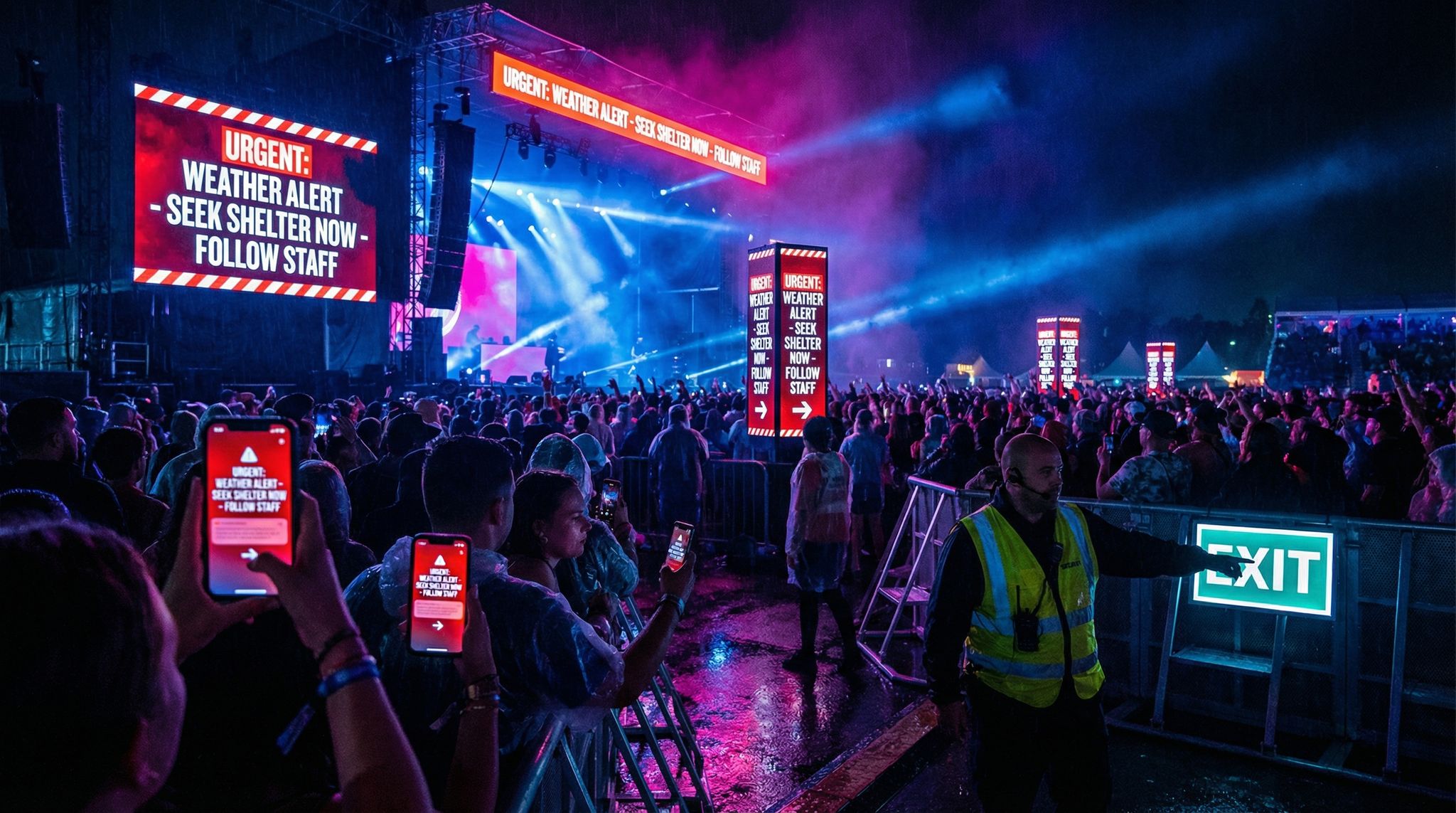
Modern events are filled with screens – LED video walls, jumbotron displays, digital wayfinding signs, projector screens, you name it. In an emergency, these screens can transform into high-visibility alert boards that reinforce your messages visually. This is immensely valuable in noisy environments (where not everyone may hear the PA) and for reaching people who are deaf or hard of hearing. Digital signage can be instantly overridden to display emergency messages and directions, a key feature of smart wayfinding and digital signage tech. For instance, those big LED walls that were showing performer video can switch to a bright alert slide: “?? LIGHTNING – SEEK SHELTER NOW. Exit Here ->” with arrows. Many festivals and venues program an “Emergency Mode” for their screens that can be activated by a single command, immediately replacing schedule content or sponsor ads with bold emergency notices. At Lollapalooza, when they evacuated for weather, the giant stage screens and delay tower screens all displayed evacuation instructions and shelter locations, complementing the audio announcements as detailed in weather-ready festival case studies. Attendees later said that seeing the instructions reinforced what they heard, making it harder to misunderstand the directive.
Visual alerts serve multiple purposes: they not only state the message, but can also point the way or display maps. Arrows, color codes (like all screens turning red for alert, green for all-clear), and even simple animations can guide people. Some advanced systems tie into crowd management software such that if a certain zone’s alarm goes off, only screens in that zone and adjacent areas flash an alert with arrows directing people out of that zone, utilizing smart wayfinding capabilities. For example, “Fire in Zone B – proceed to Zone A or C exits” might show, but only in those relevant areas, preventing alarming the entire venue if not necessary. This targeted visual communication is a powerful aspect of smart signage networks in 2026.
Even simpler, having pre-made emergency slides or crawl text to display on any video feed is crucial. If you’re running a live stream or have screens showing content, be ready to interrupt with an emergency ticker or full-screen message. It’s much like how TV broadcasts might show emergency alerts – your attendees are essentially your broadcast audience on site.
One often overlooked group that benefits hugely from visual alerts: non-native speakers. You can flash multiple languages either rotating or on different screens. For instance, the main stage screen shows English, a side screen cycles Spanish and French every few seconds. Unlike audio, you can show multiple languages simultaneously or in quick succession without needing multi-lingual announcers, a strategy supported by digital signage best practices. Major global events like Tomorrowland or Olympics do this by design – emergency graphics are prepared in the top 5 languages of attendees. Visuals also transcend language to a degree: a red flashing arrow towards an exit icon is universally understood.
Implementing Emergency Signage Overrides
To use digital signage effectively in emergencies, you should integrate and plan during your production design phase. Here’s how:
- Create Pre-Designed Emergency Graphics: Work with your creative team to design templates for various emergency messages. These should be high contrast, large font, easy to read from a distance, ensuring readability in digital signage. Use clear wording like “EMERGENCY – PROCEED TO EXIT” or “SEVERE WEATHER – SEEK SHELTER”. Include directional arrows or maps if possible on the graphic. Keep the design clean – this is not the time for fancy fonts or too much info. Often black text on yellow or white on red are used for visibility. Make versions in your key languages. Load these graphics onto the playback systems or media servers controlling your screens ahead of time.
- Set Up One-Click Triggers: However your tech is set up (be it a central media server, separate screen controllers, etc.), configure a way to quickly trigger the emergency content. For example, a lighting/video console operator might have a macro button that, when pressed, sends the “EVAC” graphic to all screens. Or a network command that the safety officer can send from a tablet to switch signage modes, a feature of smart venue emergency response. Time counts, so this should be as streamlined as possible – navigating through menus to find the image file is too slow in a crunch. Preload it and label it clearly (and test that it displays correctly!). Also decide who has permission to trigger it – the show caller, the safety director, etc. – and ensure that person is in sync with the overall emergency decision process.
- Integrate with Detection Systems if Feasible: In some venues, signage is linked with alarm systems or weather APIs. For instance, a fire alarm trigger might automatically cause all digital signs to flash EVACuation messages with arrows, leveraging smart venue automation. Or a lightning detection software could auto-post a “Lightning – Take Shelter” message if a strike is within X miles, even before human managers act (with an option to cancel if needed). These integrations can buy precious time, as noted earlier – sometimes the system can start warning people seconds or minutes before staff would be able to make a decision and announcement. If you have a tech-savvy team or vendor, explore these automation options, but also have manual control.
- Use Dynamic Wayfinding if Available: Some large scale venues use IoT sensors and AI to manage crowds, which can in turn drive signage. For example, if one exit is getting too crowded, the system could change signs to direct people to a different exit (“? East Exit congested. Use West Exit ?”), utilizing smart wayfinding and crowd flow tech. In emergencies, this kind of adaptive sign can prevent bottlenecks and shorten egress time. It’s the equivalent of traffic redirection on the fly. While cutting-edge, it’s becoming more common in 2026 at stadiums and big festivals using smart crowd management platforms. If you have such tools, leverage them in your emergency plan. If not, even a manual version (having someone at the control center update a few key signs with new info as needed) can help – it might be as simple as a staffer typing a new message on a LED marquee (“Crowd issue at Gate 1, please use Gate 2 or 3”). The agility to adapt messaging during an evolving situation is a big plus.
- Backup for Signage: Just as with PA, consider backups. If power is out, your LED screens might be down – that’s where printed signage or LED flashlights could play a role. Some events hand out LED wristbands for fun; theoretically those could be triggered to flash certain colors in an emergency (e.g., all wristbands flash red meaning evacuate). While not common, it’s an interesting backup if people are wearing event-synced devices. On a simpler note, emergency exit signs must have battery backup lighting – make sure those standard green “EXIT” signs are working and visible, since they become the default signage if your fancy digital ones fail. Also, instruct security/ushers to physically point people and even hold up arrows or glow sticks if needed.
- Regularly Update Content During an Incident: Don’t just flash one static message and leave it. If the situation changes or once people have mostly cleared, update what’s on the screens. For example, after initial evacuation, screens might switch to “Shelter in place until further notice. Stay tuned for updates.” Then later to “All clear – you may return when gates reopen” or info on cancellations, etc. This continual communication keeps people from speculating or wandering. Time-stamp updates on screens if possible (“Update 3 – 4:05 PM: Storm has passed…”) so folks know it’s current. If you have the capability, also use screens for post-incident instructions like directing people to transportation (e.g., “Shuttles will resume at Parking Lot A at 5:00 PM”) or informing about refunds if a show is cut short. It shows you’re on top of things and caring for attendees’ next steps.
For venues with advanced infrastructure, configuring an alert evacuation for digital signage often involves integrating these displays with an emergency management touch screen interface in the control room. This allows safety directors to bypass complex software menus and simply tap a “Severe Weather” or “Evacuate Zone B” icon on a tablet or dedicated monitor. The system then automatically overrides all connected screens with the appropriate high-visibility graphics and directional arrows, saving critical seconds when a rapid response is required.
To maximize the effectiveness of this setup, ensure your emergency management touch screen is programmed with role-based access controls. During a high-stress incident, an intuitive, color-coded dashboard prevents operator error. When a safety director initiates an alert evacuation for digital signage, the system should ideally provide a real-time feedback loop—confirming visually on the control room monitor that all venue screens have successfully switched to the emergency broadcast state.
Guiding Evacuations Visually
One of the most life-saving roles of signage is guiding people out efficiently. In panic, people often head back the way they came (even if there are closer exits) or they follow the crowd blindly. Good visual cues can correct that by pointing to all available exits and splitting the load. Here are strategies:
- Exit Arrows on Screens: If you have large screens near stages or in arenas, use them to show arrows pointing toward exits. Even a simple “EXIT ?” can work wonders when thousands are looking toward the stage in confusion. Coachella, for instance, has placed big LED boards that normally show art, but if needed, they plan to flash giant arrows and the word EVACUATE. Think of it like the flight attendant pointing to the exits, but via screens to the whole arena.
- Lighting as Signage: Some venues utilize lighting systems as part of emergency guidance. For example, LED light strips on the floor or walls may light up and chase toward exits (like runway lights guiding to the door). Or in a stadium, the house lights might strobe in a certain pattern directing to specific sections. One cool innovation: exit signs above doors that normally are static green might start blinking or changing color when activated, to catch attention and indicate this way out, a technique in smart wayfinding systems. At least one arena has tested exit signs that turn from green to flashing red in emergencies to really stand out. The human eye is drawn to motion, color change, and brightness – use that to your advantage.
- Crowd Density Monitoring: Some advanced systems monitor crowd density via cameras or sensors. If they detect a potential crush or jam, they could automatically trigger signs to redistribute the flow, preventing stampedes with smart wayfinding. For example, if one stairway is clogged, a sign might pop up “? Too crowded, use left stairs”. This prevents pile-ups and is part of “smart crowd management” to crush-proof a venue (coupled with trained staff on the ground). While not all events have such AI, the principle can be applied manually: assign a team member to watch CCTV or drone footage of exit routes and radio in directives to change signs or inform security to redirect people if they see congestion.
- Multilingual and Accessible Info: As touched on, rotate languages on digital signs in a way that everyone gets the message, utilizing multilingual digital signage strategies. Also consider visually indicating things for those with special needs – e.g., symbols for wheelchair accessible exits, or info like “Elevators are shut down – use ramp exit by Section B”. If you have ASL interpreters on stage normally, you should have a plan for them during emergencies too – perhaps they stand in camera view and sign the announcements, which can be shown PIP (picture-in-picture) on screens. Some festivals have interpreters for performances; those interpreters should also be briefed on emergency scripts so they can quickly sign them if needed.
- Night and Outdoor Considerations: In a dark environment (nighttime festival or indoor concert), bright screens are very effective. But if power is out at night, it’s pitch black – have battery floodlights or glow sticks ready to illuminate exits and pathways. Glow-in-the-dark tape marking along floors, or handheld LED wands for staff, can serve as makeshift signage guiding people out in darkness. In 2026, a lot of event infrastructure includes LED emergency lighting, but always double-check these systems.
A real-world example of great visual communication: Lollapalooza 2015 in Chicago pre-placed large printed banners at the festival exits saying “Emergency Shelter ->” which they unfurled during the evacuation, a tactic noted in festival evacuation procedures. They supplemented those with the LED screens, and attendees commented how they immediately saw where to go. By contrast, at a European festival years prior, some exits weren’t obvious and people wasted time looking for a way out. The difference often comes down to planning and clear signage. Don’t assume people will know – show them.
Visual Alerts & Signage Summary
Let’s compile the key points about emergency use of digital signage and visual alerts in a table for quick reference:
Smooth Entry With Mobile Check-In
Scan tickets and manage entry with our mobile check-in app. Supports photo ID verification, real-time capacity tracking, and multi-gate coordination.
| Visual Alert Method | Purpose & Example | Advantages | Watch-Outs & Notes |
|---|---|---|---|
| LED Video Screens Override | Display emergency instructions on stage and venue screens (e.g. “Seek Shelter Now” with arrows), as seen in weather-ready festival operations. | Hard to miss; can include symbols, multiple languages via smart signage; reinforces audio messages. | Prepare graphics/templates in advance; ensure text is huge & readable from afar; needs power backup. |
| Digital Wayfinding Signs | Use electronic directional signs or kiosks to point toward exits or safe zones, utilizing smart wayfinding tech. | Can be zone-specific; updates in real-time if one route is crowded; helpful for large or complex venues. | Coordinate with crowd management – wrong info could mislead; test that emergency mode overrides normal info. |
| Flashing Exit Signs/Lights | Trigger exit signs or pathway lights to flash or change color indicating evacuation route, a feature of smart wayfinding systems. | Draws attention to exits; non-verbal, intuitive cue; works even for non-native speakers or if no one can hear. | Requires install of such systems; ensure people know flashing means “exit” and not something else. |
| Printed Emergency Signage | Banners or signs stored on-site (or electronic message boards) to place as needed (e.g. “Use East Gate” arrow). | Low-tech backup; no power needed; can be deployed by staff at key junctions. | Staff must remember to deploy them; limited flexibility once printed (make them general but useful). |
| On-Screen Maps | Show venue maps on screens highlighting evacuation routes or shelter areas. | Gives contextual guidance; very useful if people unfamiliar with venue (festivals, etc.). | Might be hard to interpret in panic – keep it simple (big dots/arrows); only works if screens big and people pause to look. |
| Language Rotations | Rotating text in multiple languages on digital boards (e.g. English, Spanish, French cycling). | Reaches broader audience; prevents misinformation among non-English speakers via multilingual crisis messaging. | Balance rotation speed – don’t cycle so fast it’s unreadable; also consider pictograms alongside text to transcend language. |
Tips: Make sure your visual alerts and text align perfectly with audio announcements and pushes – a unified message across all media to avoid any confusion. It’s wise to include a time or sequence label on visual alerts (“Emergency Update 1” and later “Emergency Update 2”) so folks know it’s current and not a leftover message. Also, rehearse the switch to emergency graphics with your AV team during pre-event run-throughs (even if just a quick test off-hours) – it should be instantaneous and glitch-free when the real moment comes.
Digital signage, done right, acts as a giant, silent loudspeaker for your event’s emergency voice. Together with audio and mobile alerts, it forms a multi-layered safety net: if someone misses one channel, another will catch them. And in many cases, seeing is believing – those bold words on a screen can make the danger, and the required action, feel real and urgent, prompting faster compliance and ultimately keeping people out of harm’s way.
Grow Your Events
Leverage referral marketing, social sharing incentives, and audience insights to sell more tickets.
Wearables and Emerging Alert Tech
Alerting via Wearable Devices (Wristbands & More)
A new frontier in event safety is using wearable tech to send alerts directly to attendees’ bodies – think of wristbands that flash or vibrate, smart badges that display messages, or even personal devices like smartwatches receiving emergency signals. While still emerging, by 2026 some innovative events are experimenting with these methods to add another layer of crowd communication. For example, RFID wristbands are ubiquitous at festivals for access and cashless payments; now some vendors have versions with small LED lights or haptic (vibration) components. In principle, an event could trigger all wristbands to vibrate and glow red if a serious threat is detected – a tactile and visual cue that something’s not right. Imagine 50,000 wristbands all flashing red in unison as a silent alarm – people would certainly notice! At least one large New Year’s festival in Asia tested a system where wristbands blink specific patterns to signal “go to exits” vs “stay put” in different scenarios (accompanied by text alerts for clarity). It’s a bit high-tech, but it shows where things are headed.
Even more common devices can be leveraged: many attendees wear smartwatches or fitness bands. If you have a mobile app that sends push notifications, those often appear on connected watches too (with a vibration on the wrist). So indirectly, your push strategy might already be reaching wearables. Some safety apps can send a distinct alert to wearables that overrides silent modes – for instance, triggering a sharp vibration or alarm tone on any paired watch/phone even if it’s on silent. It’s worth informing users if possible, “If there’s an emergency, we’ll send an alert that may vibrate your Apple Watch even if your phone is silenced.” People in loud concerts sometimes feel a wrist buzz more than a pocket buzz.
Another angle: wearable displays or badges. Certain conferences use e-ink badges or LED name tags; these could theoretically receive a broadcast message and scroll “EMERGENCY – EVACUATE” on each badge. At a consumer electronics expo, attendees with smart badges all got a vibrating alert and a text display on their badge when the hall had to be cleared for a fire alarm. The technology might be expensive for general festivals, but for high-end events or as prices drop, it’s a cool method to explore.
The big advantage of wearable alerts is immediacy and personal reach. A vibration on your wrist or lights on the thing you’re wearing is pretty hard to ignore. It can cut through the sensory overload of an event. These methods also work well in noisy or immersive environments – for example, a techno rave where it’s too loud to hear a PA, but if everyone’s LED wristband that was previously pulsing with the music suddenly turns solid red and vibrates, that’s a signal to pay attention (hopefully followed by other cues like a banner or staff guidance). It’s analogous to advanced fire alarm systems in buildings that use flashing strobes and vibration for the hearing impaired or in loud factories.
Of course, wearable alert tech is only as good as its deployment and adoption. If only VIPs have the fancy bands, it’s limited. If people take off the wristbands, they won’t see it. The tech might rely on Bluetooth or mesh networks which can be tricky in crowds. So, at this time, think of wearables as augmenting your core channels, not replacing them. But in the coming years, this area is likely to grow. Event professionals are already discussing integrating emergency signals into the same RFID cashless systems they use – since the infrastructure (readers, networks) is already in place, why not piggyback a safety function?
Attendee-Initiated Alerts: Panic Buttons and SOS Apps
Mass notification isn’t only outgoing from organizers to attendees; sometimes the attendees themselves can trigger alerts that alert the organizers to a problem. This flips the script: instead of you informing them, they inform you (and then you can inform everyone if needed). In emergencies like a medical collapse or a fight breaking out, seconds count for staff response just as much as for crowd response. Lately, events have begun offering “panic button” features – usually in a mobile app – that let an attendee press a button to call for help, ensuring attendee safety at the touch of a button. This might connect to event control or security, sending the person’s location and details. Some festivals have rolled out dedicated safety apps or integrated chatbots where attendees can say “I see a fire” or “I need medical help at Stage 2”. This is highly relevant, because a crisis might start as a small incident observed by a few attendees before the organizers know. If they can quickly send an SOS, you can act faster and then push out mass notifications if it escalates.
For example, EDC Las Vegas in 2025 added an in-app SOS feature after noting that traditional comms (guards with radios, attendees trying to yell for help) were too slow in some crowd crush situations, as highlighted in reports on festival panic button apps. Attendees could tap “Need Help” in the app, select Medical or Security, and it would alert the nearest staff team. This kind of system enabled staff to reach distressed fans faster, preventing some incidents from worsening. Similarly, some panic-button apps allow staff and crew to trigger a venue-wide alert from their phones if they see something (useful if a security guard is the first to spot a hazard and can activate an alarm or message immediately without running to the control room). In a tragedy like Astroworld, reports indicated that front-line staff’s inability to effectively communicate the unfolding crowd crush was a contributing factor, as detailed in analyses of critical communication failures – imagine if each roving guard had a panic button app that broadcast “STOP SHOW NOW” to leadership when pressed. It might speed up decision-making in chaotic scenarios.
For organizers, implementing an attendee panic button or incident report system means you have to be prepared to monitor and respond. It’s like an added input channel in your control center. But many see it as worthwhile – it’s essentially crowdsourcing your eyes and ears for early warning. If you go this route, train your response team on how to triage incoming alerts (they may get false alarms or trivial issues too). Integrate it with your radio protocol: e.g., if a panic app report comes in, immediately radio the nearest security supervisor to verify and act. One festival was able to catch a small fire in a vendor tent within one minute because an attendee used the app to report seeing smoke – staff got there and extinguished it before it spread, and no mass panic occurred. That attendee effectively became a sensor for the event.
While not exactly “mass notification tech” in the outward sense, panic button systems directly impact the success of your emergency comms: they enable faster organizer decisions and trigger points. The sooner you’re aware of a crisis, the sooner you can notify everyone else. Plus, advertising that such a safety feature exists can even reassure attendees (they feel empowered that they can call for help). It builds trust and a safety culture, which in turn can make people more responsive to your instructions because they see you take safety seriously, often facilitated by festival panic button apps.
Future Tech: AR Glasses, Drones, and More
Looking ahead, other emerging tech could play a role in emergency communications at events:
- AR (Augmented Reality) Glasses: It’s early days, but imagine attendees wearing AR glasses (some VIP experiences already toy with this). In an emergency, those glasses could display big blinking arrows or “EVACUATE” messages layered over their view, no matter where they look. AR apps on phones could do similar – hold up your phone camera and see virtual signs pointing to exits. This is more futuristic and requires attendees using AR, but companies are exploring it for large venues as a wayfinding aid, which naturally extends to emergency use, a concept discussed in smart wayfinding solutions. As AR adoption grows, events may incorporate an “AR emergency overlay” feature in their apps for those using it.
- Mass Notification Drones: Some safety teams are testing using drones equipped with speakers or LED panels to fly above crowds and broadcast messages or signals. For instance, a drone could hover and announce (like a flying PA) or display a flashing sign from above. They can reach places humans can’t quickly, and cover a wide area. One concept is a swarm of mini drones that could form an arrow in the sky pointing the way out (it sounds like sci-fi, but with those drone light shows we see at events, not impossible!). However, drones have their own risks and regulatory issues, so this is an experimental area.
- Haptic Alerts in Clothing: Some athletic wear now has haptic feedback (think vibrating in sync with music). It’s conceivable future festival merch could have an alert function – e.g., a smart wristband or even a vest that vibrates patterns. The wristbands we discussed already cover this idea on a small scale. As costs drop, giving every attendee a cheap “buzz band” that can buzz specific patterns (like Morse code for emergency) could be viable and serve as both a fun feature and a safety device.
- AI-Powered Personal Assistants: If people have something like earbuds in with an AI assistant (Siri, Google Assistant), perhaps an emergency alert could be pushed to those through a special channel, literally speaking into their ear “This is an emergency announcement: …”. Already, the U.S. FEMA has an “Emergency Alert” that will override Do Not Disturb on phones – it’s possible similar could be done for events via an app integration.
All of these are not mainstream yet, but they show the direction of travel: more personal, pervasive alerting so that no matter what an attendee is doing – dancing, in the bathroom, VR gaming – a critical alert finds them in some way. For now, focus on proven tech (SMS, push, PA, signage) as the backbone, and use wearables and such as a bonus layer if you have them. The good news is, each new method adds redundancy and reaches someone that might have missed the other – which is exactly what you want in emergency comms.
Implementing an Integrated Emergency Communication Plan
Technology alone won’t save the day without a solid plan and trained people behind it. Implementing mass notification tech at your event requires careful planning, cross-system integration, staff training, and regular testing, as emphasized in festival evacuation planning guides. Here we’ll break down how to build an emergency communication plan that brings all the tools together and ensures they work when it counts.
Planning: Assess, Integrate, and Assign
Start by assessing your venue and event specifics: What are the potential emergencies (weather, security, medical, etc.) and what communication tools make sense for each? A outdoors festival may worry more about weather and need off-grid comms, while a stadium concert might focus on evacuation for security threats, a distinction noted in reports on the Astroworld tragedy. Map out for each scenario which channels you’d use – usually, the answer is “all available channels” for anything major, but there might be nuances (e.g., if evacuating only one stage, maybe only push and PA in that area, not SMS to everyone). Create an Emergency Communication Plan document that outlines these scenarios, the authorized senders, and the message templates. This should align with your overall emergency action plan – for example, if your EAP says “stop show for lightning at 8-mile proximity,” the comm plan says “when lightning trigger hit, Safety Officer sends pre-written lightning hold message via app, SMS, PA, screens within 1 minute of decision.” It’s essentially the comms play-by-play.
Next, focus on system integration. Ideally, you want a cohesive system where triggering an alert is as centralized as possible. That could mean using a mass notification software that ties into SMS, email, app push, and even calls and sirens (there are products like Everbridge, Rave, etc., used on campuses and stadiums, that let you compose one message and broadcast across multiple channels at once). If you have the budget and scale, evaluate these platforms – many in 2026 have APIs that can even hook into your ticketing CRM to grab attendee contact info quickly, or into venue systems to trigger PA/messages, supporting multi-channel emergency plans. If a single platform isn’t feasible, create a workflow where, say, one person is assigned to SMS, one to app, one to PA, but they coordinate from the same radio call. The key is that integration is more procedural than technical in that case – people acting in sync to cover all bases. If your ticketing partner has a built-in messaging tool (some do for emailing attendees, etc.), see if it can be used quickly in a pinch or pre-load emergency lists. The goal is that when you hit the panic button (figuratively), all the channels fire off within seconds of each other.
When evaluating the best mass notification systems for crisis management in 2026, venue operators should prioritize platforms that offer seamless API integrations with existing ticketing CRMs and on-site hardware. Top-tier solutions now feature automated threat-level triggers, allowing a single operator to deploy pre-scripted alerts across SMS, mobile apps, and digital signage simultaneously. Selecting a robust, enterprise-grade platform ensures that your multi-channel strategy executes flawlessly under pressure, eliminating the technical friction that often delays critical broadcasts.
Assign clear roles for emergency communications. Define who is in the “Communications Team” when crisis hits, as outlined in festival evacuation procedures. For a small event, it might just be you and one assistant. For a large festival, it could be a rep from operations, marketing (for social media), a security liaison, and technical coordinators. Important roles include:
- Message author/approver: often the Safety Officer or Event Director who says “Yes, send the evac message now.”
- Senders/operators: the individuals who actually use the systems – e.g., the person who hits send on the SMS platform, the person on the radio cueing MCs, the AV tech who throws the switch on screens. They should know their specific task cold.
- Liaisons: someone might need to liaise with external bodies like police or fire chiefs in the command center – they feed info to the comm team (“fire says exit Gate 4 is blocked, announce to use other exits”). Also PR or media liaison, who will handle external communications (like posting on Twitter, updating website, or dealing with press if needed). While not directly informing attendees on-site, external comms are part of the bigger picture – for instance, you might tweet the same emergency messages for any off-site attendees or updates to families.
Make sure these people are identified in your plan and all relevant contact info is exchanged (phone numbers, radio channels, backup contacts). It’s good to have a group chat or hotline for the comm team in case normal methods fail (e.g., a WhatsApp group among the key staff as a redundant line of comm during an incident – just be mindful to keep it focused).
For mega-events, stadium tours, or multi-venue festivals, organizers frequently coordinate these roles through a Global Security Operations Center (GSOC). If you need to draft mass notifications for a GSOC-managed critical event, the most effective approach is to build a comprehensive matrix of pre-approved message templates tailored to specific threat levels. Following the best practices for handling mass notifications during emergencies dictates that these GSOC templates should include dynamic placeholders for location, action required, and time of next update. This ensures that when a crisis hits, the security team isn’t writing copy from scratch; they are simply filling in the blanks and executing the broadcast across all integrated channels.
When establishing these protocols for upcoming event seasons, venue operators should also define strict escalation matrices. The most effective best practices for mass emergency notifications in 2025 and 2026 dictate that a GSOC operator must know exactly which threat levels require immediate venue-wide broadcasts versus localized zone alerts. By pre-defining these thresholds, your security team eliminates hesitation, ensuring that critical alerts are dispatched the moment a threat is verified.
Integrate with local authorities too: often police or fire will want to approve public messages in certain scenarios (particularly security threats) or they may have their own mass notification (like a city text alert) that needs coordination. Establish beforehand how you will coordinate messaging with them – perhaps you agree that you’ll send the immediate life-safety instructions (e.g. evacuate), and they’ll handle any detailed follow-up info about the threat. Or vice versa. In any case, loop them in on your comm plan during pre-event meetings, so there’s no tug of war or contradictory statements if something happens, effectively coordinating with on-site emergency services.
Finally, consider the “human factors”: in a crisis, people are scared, adrenaline is pumping. Write your protocols and train folks so that when it’s go-time, it’s almost automatic. The more you eliminate uncertainty (by planning and roles), the faster and smoother your comm execution will be. It might help to have a checklist of steps to take when an emergency is declared, something like:
- Decision made by Incident Commander to [hold/evacuate/etc]. Time: ___.
- Activate emergency comms:
- Send pre-written SMS #1 (Safety Officer authorize; Comms person send via platform).
- Trigger App push (App team lead to send).
- Radio all stage managers: “Stop show, make announcement now” and read script.
- Activate screen graphics (Video lead execute macro).
- Post to Twitter and Facebook (Marketing lead).
- Monitor response and crowd movement via CCTV, ground reports.
- Issue update message after 10 minutes or as needed…
And so on. Having this kind of checklist visible in the ops center can focus everyone. It mirrors how pilots handle emergencies (they use checklists to not forget anything vital under stress).
Training Staff and Running Drills
No matter how fancy the tech, staff training makes the difference in real-world performance . You need to train both the core comms team and the general event staff/volunteers on emergency procedures. Here’s how:
- Pre-Event Briefings: Include emergency comm protocols in your staff briefing sessions. Explain what alerts will look/sound like, so staff recognize them and know how to respond themselves. For example, tell your crew, “If you see the stage screens flash EVAC, that means start ushering people out as per our plan.” Security and ushers should be crystal clear on their roles when an alert goes out: which exits they man, how to assist special needs attendees, etc. (This is broad event safety training, but it overlaps with comms – they need to know what the messages will be telling people to do, so they can help enforce/facilitate that), as detailed in assigning staff roles for evacuation.
- Tool-Specific Training: Train the individuals who’ll operate the comm tech in a hands-on way. If someone is responsible for the SMS system, let them practice creating a dummy alert. Make sure they know any quirks (like it might take 30 seconds to actually fan out, or how to check if it sent). If your MC might be reading an announcement, rehearse that with them on mic during soundcheck – even just one run so they don’t get stage fright when saying something serious. Train the social media person on drafting a quick crisis post (maybe even have some templates ready for them too, to avoid typos in panic). If you have bilingual staff for translations, have them prepare and practice their part. The idea is to eliminate first-time learning during the emergency – everyone should have at least once done the action they’ll need to do, even if simulated.
- Drills and Simulations: Conduct drills, which can range from simple to elaborate. A basic and common one is a tabletop exercise – gather the key team in a room and walk through a hypothetical scenario (“It’s 3 PM, 2 hours into the fest, massive storm heading in.”). Each person states what they’d do, what they’d communicate, and you hash out any gaps. This primes the team mentally. A step up is a communications drill without attendees, perhaps during setup or an off-hour: you actually trigger the systems (send a test push, have MC read a test announcement, flash the screens) and see if all parts work and team reacts as expected. Make sure everyone treats it seriously. In some cases, you might involve local police/fire in these drills (they’ll appreciate it, because it shows you’re proactive). High-end festivals sometimes do a full field exercise with staff playing roles of attendees evacuating to test crowd movement, but that’s not always feasible. At least do something.
- Train for Plan B/C: Teach staff what to do if primary comms fail. Example: “If the power is out and PA doesn’t work, security team do megaphone evacuations sector by sector.” Or “If SMS platform is down, we use Twitter and loudhailers as fallback.” This way no one freezes if a tool doesn’t work – they switch to contingency. A PACE approach (Primary, Alternate, Contingency, Emergency communications) is helpful to instill, which is part of crisis-proofing your event tech. For each channel, what’s the backup? Train that too. If the person who usually hits the ‘send’ button is unavailable (maybe they’re dealing with something else), who’s the backup? Cross-train a couple people on critical systems where possible so you’re not single-threaded.
- Volunteer and Vendor Awareness: Don’t forget non-staff like vendors, third-party crews, etc. They should at least know the basics of how they’ll be notified and what to do. E.g. tell food vendors, “If you hear ‘Code Red’ announced, that means close your booth and seek shelter immediately.” Some events give vendors a flyer with emergency instructions and phone tree contacts. Everyone on site is part of the safety ecosystem – the more they know, the smoother it will go. Also, consider providing a cheat-sheet card to all staff with key emergency actions and comm signals (like a little card: “Emergency Codes: Code Orange=Weather shelter, Code Green=All clear; If you hear/see this, do that…”). It’s hard to memorize everything, so a reference helps under stress.
Regular training not only prepares people technically, it also builds a culture of readiness. When your team sees that safety drills are taken seriously by leadership, they’ll take them seriously too and feel more confident. Confidence is contagious to attendees as well – trained staff directing evacuees assertively can reassure the crowd that “these folks know what they’re doing,” preventing panic.
Testing Your Systems (Don’t Skip This!)
We’ve mentioned testing a few times, but it deserves emphasis: test all aspects of your emergency notification system before the event – and even during, in non-intrusive ways. You don’t want to find out the hard way that a speaker isn’t connected or a message template had a typo.
- Tech Tests: At a minimum, do a full systems test with your team: send test messages over each channel (mark them clearly as tests). For PA, maybe play a test announcement through each zone. For signage, display the graphics briefly (maybe before gates open or during soundcheck). If you worry about confusing attendees with tests, do it when none or few are around (pre-gates or post-show). Or coordinate a test during a calm moment and announce that it’s a test – some events have done a midday “this is a drill” announcement to satisfy permits or just to practice. If you do this, make absolutely sure it’s clearly communicated as a test to avoid panic.
- Time It: Observe how long each method takes from trigger to audience. For instance, you hit send on SMS at 5:00:00 PM – your team in the field reports phones buzzed by 5:00:20 PM. Push notification might be even quicker or similar. PA is instant but takes time for people to hush and listen. Knowing these latencies helps manage the sequencing. Maybe you’ll send SMS one minute before you plan to do the PA announcement, or vice versa depending on which is faster, so they coincide. Or you realize the festival-wide Wi-Fi is spotty so push might lag until phones catch a network – then you double down on PA and SMS for the initial hit.
- Dry Runs with Scenario: If possible, do a quick dry run with the core comms crew on show day – gather on radio and say, “Emergency drill: lightning scenario, go.” Then everyone says what they’d be doing (without actually spooking the crowd). It’s like a verbal rehearsal. Could even be done morning-of just to refresh memory.
- Post-Test Adjustments: Use what you learn to fix gaps. Did some security staff not hear the radio call during the test? Maybe adjust radio procedure or add a backup channel. Did the LED screen take 30 seconds to switch content due to some system setting? Talk to the AV tech to see if it can be sped up or if they should pre-load content differently. Continuously improve the plan from these tests. And log the test results as part of your safety documentation – it shows you took due diligence (helpful for permitting and insurance too), a key aspect of crisis-proofing event technology. If you’re very thorough, hold a quick debrief with the team: “What went well, what didn’t?” after a drill.
To illustrate implementation, here’s a sample timeline of how an event could prepare and execute their emergency comm plan:
| Phase | Key Emergency Communication Activities |
|---|---|
| Pre-Event (Months out) | – Include emergency comm requirements when evaluating event tech vendors (ensure ticketing/app can export contacts quickly, etc.) – Draft emergency message templates for SMS, app, PA, social media (get them approved by stakeholders) using pre-written scripts. – Meet with local emergency services to align messaging protocols (who announces what, how to coordinate). |
| Pre-Event (Weeks out) | – Set up mass notification tools (upload attendee contacts into SMS system, configure app push settings, test integrations). – Design & load emergency graphics in digital signage system. – Assemble the Comm Team and assign roles; distribute the written Emergency Comms Plan. – Conduct a tabletop simulation with key staff, refining roles and message content. |
| On-Site Setup (Day before or Day of) | – Test PA systems and backup power; ensure all zones have coverage as part of evacuation planning. – Send a test SMS or push to staff phones to verify delivery speeds. – Do a dry run: have MC read a test emergency announcement during rehearsal (and audio crew practice ducking music). – Brief all crew/volunteers on what to do when they hear/see alerts; distribute quick reference cards. |
| During Event (Monitoring) | – Actively monitor weather radar, crowd density metrics, security intel, etc., for early warning triggers, utilizing smart wayfinding data. – Keep Comm Team on standby (in EOC or via radio). – If signs of trouble: prepare draft messages (e.g., if weather looks bad, have the alert ready to send pending decision). – Ensure battery backups and generators are online in case needed. |
| Emergency Occurs (Execution) | – Incident Commander gives go-order for emergency messaging. – Immediately send out alerts on all channels (SMS, push, PA, signage) per plan, following multi-channel strategies. – Staff begin directing attendees as messages instruct (ushering, answering questions). – Comm Team monitors channels: check SMS delivery reports, ensure PA was audible (field feedback), watch for any confusion on social media or among crowd. – Provide an update within the promised timeframe (even if “stand by”). |
| Post-Incident (Recovery) | – Once threat resolved, send all-clear messages: e.g., “All Clear – you may return or event is ending” as appropriate. – Thank attendees for cooperation (helps goodwill after a scare). – If event is resuming, clearly communicate new schedule or instructions; if ending, give info on refunds or exits. – Avoid information voids – even if uncertain, say “We will have more info soon, please stay put”. |
| Post-Event (Debrief) | – Meet with the team to review emergency comms performance: what worked, what didn’t. – Gather data: message send times, crowd reaction observations, any incidents. – Document lessons and update the Emergency Comms Plan for future events, a crucial step in crisis-proofing. – Share successes with stakeholders (e.g., “our multi-channel alerts evacuated the site in 15 minutes without injury”) and note any improvements needed (maybe invest in better loudhailers, etc.). |
Following a structured plan like this ensures that when the pressure is on, your team isn’t scrambling – they have a playbook. It blends the technical tools with human decision-making and action. Many events also find that practicing their emergency comms yields side benefits: the crew feels more confident overall, and small inefficiencies in normal operations get fixed as an offshoot of drilling the extreme scenarios. It’s truly a best practice area where Experience, Planning, and Tech all intersect.
Real-World Lessons: When Emergency Communication Succeeds (and When It Fails)
Let’s examine a few real-world event emergencies to see how communication tech and strategy played a role. These examples drive home the stakes and the outcomes of good or bad communication.
Success Stories: Guiding Crowds to Safety
- Lollapalooza, 2012 & 2015 (USA) – Proactive Storm Evacuation: Lollapalooza in Chicago faced sudden thunderstorms that led organizers to evacuate tens of thousands from Grant Park. Thanks to a clear plan and multi-channel communication, the evacuations were lauded as a success, as reported in coverage of the Lollapalooza evacuation. Organizers, working with city officials, did not wait until chaos ensued – they pulled the plug on performances early and blasted the message out via stage PA, text alerts, social media, and on-site signage, a strategy highlighted in weather-ready festival case studies. They even had city emergency sirens ready but found the controlled announcement was enough. Because fans received consistent instructions (“head to the underground parking garages designated as shelters”), they moved calmly. One attendee remarked, “It was amazingly orderly – like a fire drill. We all got out and back in safely.” By acting early and communicating clearly, Lollapalooza turned a potential disaster into a merely extended intermission. The rapid resumption of the event afterward (once weather cleared) also owed to trust built with the audience; they felt the organizers had put safety first and kept them informed, so they cooperated fully, allowing the show to go on.
- Rock am Ring, 2017 (Germany) – Calm Evacuation for Security Threat: During Rock am Ring, police received a credible terror threat and asked to evacuate the festival until it could be cleared, an incident detailed in reports on the Rock am Ring evacuation. Organizers immediately took to the stage microphones and screens to address the crowd of ~90,000. They made an announcement in multiple languages urging attendees to leave calmly to the campgrounds and await further info. Crucially, they used phrases that reassured (“there is a security issue, please stay calm and cooperate”) yet conveyed urgency. The immense crowd exited without panic or injury, guided by both the announcements and a heavy presence of staff and police showing directions. Attendees later praised the communication, with one festival-goer telling The Guardian, “Everyone knew what to do. There was no panic because they explained it well.” The next day, the threat was cleared and the festival resumed, with organizers sending SMS and social updates overnight to keep everyone in the loop. The takeaway: even for an extremely sensitive situation like a possible terror threat, transparent and bilingual communication maintained order and trust, avoiding what could have been a dangerous stampede in the dark of night.
- Tomorrowland, 2022 (Belgium) – Efficient Fire Response: At the massive Tomorrowland festival, a small fire broke out in one of the stages’ production areas. Within moments, organizers used the event app to push a notification to attendees in that zone (geofencing via the app) telling them to calmly move away and that staff were handling it. Simultaneously, a voice announcement on that stage PA directed people out of the stage area and to remain patient. Because the messaging was tight and localized, only the affected area was evacuated, and there was no mass panic across the whole festival. The fire was contained by on-site firefighters in minutes. Many attendees in other areas didn’t even know it happened until later – a sign of how targeted and effective the comms were. A case like this shows that integrated tech (geotargeted app alerts + local PA) can swiftly resolve an incident without derailing an entire 200,000-person event.
- New Year’s Eve Celebration, 2020 (Sydney, Australia) – Weather and Crowd Warnings: During Sydney’s famous NYE fireworks event, authorities used a combination of SMS geo-targeting and public big-screen messages to warn crowds of an approaching severe thunderstorm. Hundreds of thousands of people were gathered around the harbour. The mass SMS went to all phones in the area (via government system) advising people to seek shelter, and digital billboards echoed the alert. While some got drenched, the crowds had largely moved to safer spots or taken out rain protection by the time the squall hit. Later, an official noted that using every channel – including the government’s city-wide text alert – prevented major injuries, as there have been past instances of chaos when storms surprised dense crowds. It reinforces that collaboration with public safety comms (if available) and layering on-site signage can manage even city-scale events.
These success stories share common threads: early action, consistent multi-channel messaging, clear instructions, and maintaining attendee trust. They turned potentially dire situations into footnotes because communication was handled expertly. Attendees often will do the right thing if you tell them clearly and quickly what the right thing is.
Cautionary Tales: Communication Breakdowns
- Astroworld Festival, 2021 (USA) – Inadequate Communication Amid Crowd Collapse: The Astroworld crowd crush tragedy is a complex case with many failures, but one aspect highlighted by investigators was a breakdown in emergency communication on-site, as discussed in analysis of the Astroworld communications failure. Frontline security and medical staff were overwhelmed and were trying to call for the show to stop and get help, but radio channels were jammed or procedures unclear. Attendees did not receive any timely information about what was happening – the music continued for 30+ minutes while people were being injured. No public announcements were made early enough; when they finally cut the show, panic had already set in. Confusion and lack of instruction contributed to continued chaos. In hindsight, experts note that activating an emergency stop and making a clear announcement to the crowd to move out or make space sooner could have mitigated the disaster. Astroworld underscores that having all the tech in the world means nothing if the decision/coordination to use it is too slow or disorganized. It led to renewed calls for better training of staff in crisis communication and for events to have a unified alert system beyond just radios – for instance, a way to override sound systems immediately and broadcast a “stop and disperse” message when needed, a recommendation found in post-Astroworld safety reports. Many festivals took Astroworld as a wake-up call to revisit their crowd emergency protocols.
- Love Parade, 2010 (Duisburg, Germany) – Misinformation and Panic: The Love Parade EDM event tragically saw a crowd crush in a tunnel entrance. Part of the post-incident analysis pointed to poor communication both to the crowd and among officials. As the tunnel became dangerously overcrowded, there were no audible warnings or instructions to those entering. People in the crowd had no idea that just ahead, a deadly jam was occurring. After the tragedy unfolded, communication to attendees was also lacking – many didn’t know where to go or what happened, which increased confusion and trauma. Police loudspeakers reportedly gave some orders but conflicting (some said “go forward,” others “go back”) which worsened the chaos. This horror exemplifies that confusing or absent communication in a crowd emergency can lead to panic and tragedy. Clear, unified messaging (like blocking incoming people and directing the crowd to safe exits) might have reduced the pressure. It also showed the need for monitoring crowd density and sending alerts to stop inflow in real-time – now a focus of modern crowd management tech, often integrated with smart wayfinding systems.
- TomorrowWorld, 2015 (USA) – The Stranded Thousands (revisited): We discussed this in the SMS section: a lack of timely communication (plus poor logistical planning) left thousands stranded in bad weather. Attendees had no idea what to do when shuttles stopped; official channels were largely silent for hours. Many relied on social media and hearsay. The organizers eventually sent emails and posted online in the middle of the night, but by then many had literally slept in mud or walked miles. This case shows that even if an evacuation isn’t life-or-death but rather a logistical emergency, failing to communicate can tarnish your event’s reputation permanently. TomorrowWorld’s brand never recovered. If they had used an emergency SMS or had staff with bullhorns guiding people to, say, a waiting area with buses, the outcome (while still inconvenient) would have been far safer and less damaging. Communication in this case was about customer safety and comfort as much as immediate hazard – reminding us that mass notification is also about managing any large-scale disruption humanely.
- Fyre Festival, 2017 (Bahamas) – No Information = Chaos: The infamous Fyre Festival wasn’t an acute “emergency” like a storm or attack; it was an operational failure. But it serves as a lesson in how the absence of communication fuels chaos. When attendees arrived to find no infrastructure, they panicked and fended for themselves largely because officials gave no clear info or instructions. People didn’t know where to go, where to get water, or how they’d get home. One attendee said, “If someone had just gotten on a megaphone and told us what to expect, we would’ve stayed calmer. Instead, it was silence or lies,” a sentiment echoed in discussions on keeping attendees informed. Fyre organizers infamously went radio silent on social media once things went south, compounding anger and confusion. The takeaway: even in a non-traditional emergency, you must communicate honestly and continuously. When the event is falling apart, telling attendees what is being done (or even admitting the situation) is better than leaving a vacuum. Otherwise rumor and fear take over, and you lose all trust (and likely face legal consequences, as Fyre did).
Examining failures often teaches more than successes. In all these cases, a common theme is lack of a unified, prepared communication strategy, and sometimes a hesitation to use what tools were available. Either messages came too late, were inconsistent, or didn’t exist at all. For current and future organizers, these cautionary tales underscore why we invest in emergency comms – it’s not just a checkbox, it’s a potential life-saver and reputation-saver.
Frequently Asked Questions
What is emergency mass notification technology for events?
Emergency mass notification technology includes SMS blast systems, mobile app push notifications, PA system overrides, and digital signage used to instantly alert crowds. These tools allow organizers to deliver unified, time-sensitive instructions to tens of thousands of attendees simultaneously, preventing panic and guiding safe evacuations during crises.
Why are SMS alerts effective for event emergency communication?
SMS text messaging is effective because it reaches 98% of mobile phones without requiring an app or internet connection. It works on low-bandwidth networks where data might fail, ensuring critical safety instructions like “seek shelter” reach attendees instantly, even those not looking at stage screens.
How do mobile app push notifications help during event emergencies?
Mobile app push notifications act as a pocket PA system, delivering rich alerts with maps and detailed instructions directly to smartphones. They allow organizers to target specific zones using geofencing and provide real-time updates, though they function best when combined with other channels like SMS and audio announcements.
What is the “one voice” policy in event safety?
The “one voice” policy ensures all emergency instructions come from a single, authoritative source to avoid confusion. Whether delivered via stage MCs, PA systems, or digital screens, the message remains consistent in tone and content, preventing conflicting directions that could lead to chaos or dangerous crowd surges.
How can digital signage be used for crowd evacuation?
Digital signage aids evacuation by instantly overriding standard content with high-visibility emergency messages and directional arrows. LED video walls and wayfinding screens can display color-coded alerts (like red for danger) and multilingual instructions, guiding attendees to safety even in noisy environments where audio announcements might be missed.
How does mass notification technology prevent crowd panic?
Mass notification technology prevents panic by filling the information vacuum with clear, authoritative instructions. Timely alerts remove uncertainty, reducing fear and rumors that trigger stampedes. When attendees receive specific directions via text or screens, they are more likely to remain calm and move in an orderly fashion.
Can RFID wristbands be used for emergency alerts at festivals?
RFID wristbands and wearables can serve as silent alarms by vibrating or flashing specific colors, such as red, to signal an emergency. This emerging technology provides a tactile and visual cue in loud, immersive environments, alerting attendees to check their phones or look at screens for further instructions.
What are festival panic button apps?
Festival panic button apps allow attendees to instantly report emergencies like medical issues or security threats to organizers. These attendee-initiated alerts act as a crowd-sourced early warning system, enabling staff to respond faster to specific locations and potentially trigger mass notifications before a situation escalates.
What should be included in an event emergency communication plan?
An event emergency communication plan must include pre-written message scripts, defined staff roles, and integration steps for all alert channels. It outlines specific protocols for scenarios like weather or security threats and designates a chain of command for authorizing and sending alerts via SMS, apps, and PA systems.
How often should event emergency notification systems be tested?
Emergency notification systems should be tested before every event and during setup to ensure functionality. Organizers must verify delivery speeds for SMS and push notifications, check PA system coverage in all zones, and run dry runs with staff to practice triggering alerts and reading scripts under pressure.
How do you communicate emergency alerts to non-English speakers at events?
Communicating with non-English speakers involves using digital signage to rotate emergency messages in top attendee languages and displaying universal symbols like arrows. Pre-recorded audio announcements in multiple languages and multilingual push notifications ensure diverse crowds understand critical evacuation instructions and safety warnings.
Why is a multi-channel approach important for emergency alerts?
A multi-channel approach is vital because relying on a single method creates safety gaps. Integrating SMS, mobile apps, PA systems, and visual signage ensures redundancy; if an attendee misses a text due to network congestion, they will likely hear the audio announcement or see the visual alert on screens.
Is emergency mass notification required for large events?
While regulations vary, robust emergency communication is increasingly required for safety permits and insurance compliance. It represents a fundamental duty of care, as modern attendees expect instant notification. Failure to provide timely alerts can lead to legal liability, reputational damage, and preventable injuries during crises.
What are the best practices for writing emergency SMS alerts?
Effective emergency SMS alerts should be short, specific, and action-oriented, leading with a clear keyword like “Weather Alert.” Messages must state exactly what to do, such as “Seek shelter immediately,” and include a timestamp for updates. Organizers should obtain opt-in consent during registration to ensure high delivery rates.
How do event organizers communicate during a power outage?
During power outages, organizers rely on backup generators for critical PA systems and battery-powered emergency lighting. If electronic systems fail completely, staff utilize loudhailers, megaphones, and pre-printed signage to direct crowds, ensuring communication continues through a “PACE” plan (Primary, Alternate, Contingency, Emergency).
What are the best practices for mass emergency notifications in 2026?
The best practices for mass emergency notifications in 2026 emphasize a multi-channel approach, utilizing pre-scripted templates, and integrating systems through a centralized dashboard or GSOC. Organizers should prioritize speed, ensure messages are accessible and multilingual, and conduct regular full-system drills to verify that SMS, push alerts, PA systems, and digital signage all trigger simultaneously.
How do you configure an alert evacuation for digital signage?
Configuring an alert evacuation for digital signage involves pre-loading high-contrast, easy-to-read emergency graphics onto your media servers. These displays should be linked to an emergency management touch screen or automated trigger in the control room, allowing staff to instantly override standard event content with directional evacuation arrows and safety instructions.
How do you draft mass notifications for a GSOC-managed critical event?
To draft mass notifications for a GSOC-managed critical event, create a matrix of pre-approved, scenario-specific templates before the event begins. These templates should include dynamic placeholders for the specific location, required attendee action, and the time of the next update. This allows Global Security Operations Center personnel to quickly fill in the missing details and deploy the alert across all integrated channels without wasting time writing copy during a crisis.
What are the best mass notification systems for crisis management in 2026?
The best mass notification systems for crisis management in 2026 are enterprise-grade platforms that offer seamless API integration with event ticketing CRMs, mobile apps, and venue hardware. Top solutions provide automated threat-level triggers, multi-channel broadcasting (SMS, push, PA, and digital signage) from a single dashboard, and robust redundancy to ensure alerts are delivered instantly even during network congestion.